
Can't be turned on
·Check the power adapter. Only connect the power adapter to a power outlet, not to the unit. If the LED on the adapter blinks or does not light up, the adapter is defective.
·Check the power connection.
No sound
· The device did not power on. Check LED and the power connection.
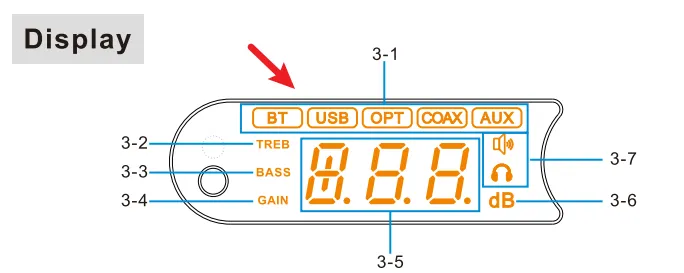
· Check that the proper input source is selected. Press the knob to switch input channel.
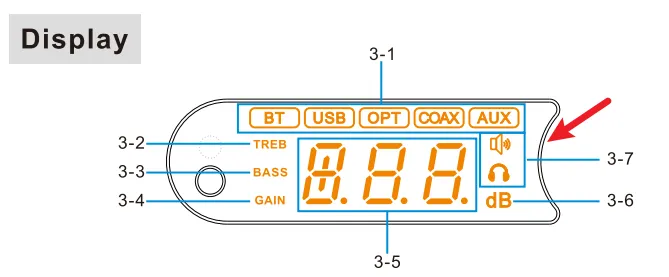
· Check that the proper output channel is selected. Doule-press the knob to switch output channel.
· Check the connections for all devices.
· Insert connection cables all the way in.
· Check the volume of all devices and whether they are muted.
* Bluethooth IN: Too low volume on phone. Please adjust volume.
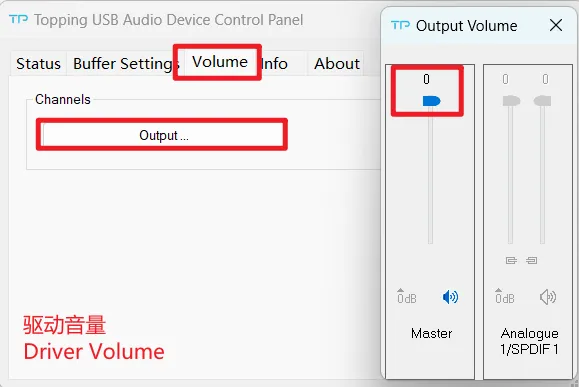
* USB IN: 1) Too low volume on PC. Please check and adjust the computer system volume, music player volume and driver volume. 2) Select the default output device of your music player or computer as this unit.
Abnormal sound
· One channel’s positive output and negative output mayb be reversed, please check and correct it.
· The cables may not be connected correctly, check and reconnect them.
· Probably overloaded. Try turning down the volume.
· May be caused by high temperature. Turn the power off, wait for the unit to cool down sufficiently, and then turn the power on again. Please place the unit in a place having good ventilation.
· Check to see if the problem is with the source, downstream equipment and cables.
One channel with noise/no output
Check to see if the problem is with the source, downstream equipment and cables. You can try swapping the left and right channel connections.
Channel imbalance
Check to see if the problem is with the source, downstream equipment and cables. You can try swapping the left and right channel connections.
Can the amp be used in bridged mode so that it can be used as a mono amp?
The amplifier is already internally bridged. So no you can't short the any of the output terminals together.
Cannot pair the Bluetooth
· Enable Bluetooth function in the setup menu first.
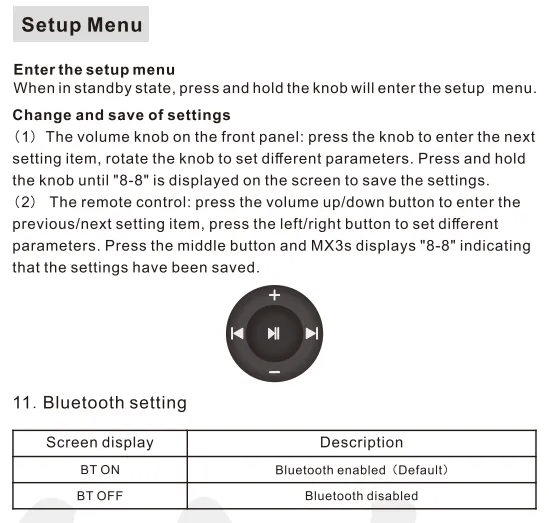
· May be already connected to another Bluetooth device. Press and hold brightness button on the remote control for 3s to let this unit enter pairing mode.
· Bring the Bluetooth device near to this unit.
· Turn the power of the unit off and on again, and then try again.
Bluetooth in: the sound is cut off
· Bring the Bluetooth device near to this unit.
· Remove obstructions between the Bluetooth device and this unit.
· To prevent electromagnetic interference, locate this unit away from microwave ovens, wireless LAN devices and other Bluetooth devices.
· Reconnect the Bluetooth device.
The connected USB device does not recognize this unit
· USB cable did not connected properly. Please check or change the cable.
· Try with another USB port.
· Driver problem. Try to reinstall the driver.
· May be caused by the PC. Check or try with another PC.
· Some phones require OTG function to be enabled first.
Remote control not responding
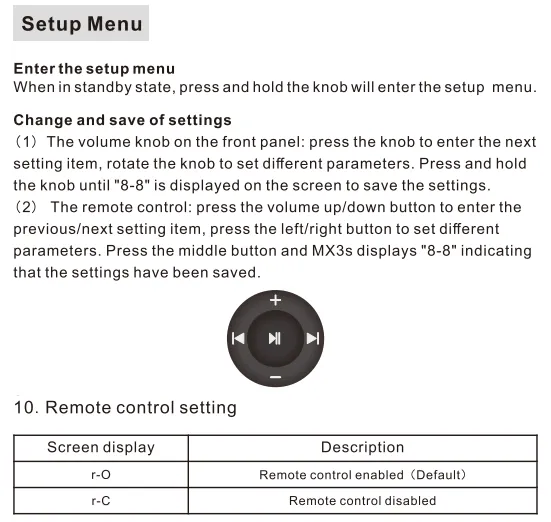
· Enable remote control function in the setup menu first.
· Try to insert two fresh AAA batteries.
· Please aim at the remote control receiver.
· Bring the remote control close to the device.
· Use your Android phone's camera to look at the transmitter at the top of the remote, if it doesn't blink when you press the remote button, the remote is defective.
· If you have more than one Topping device, check that you are using the correct remote control.
GAIN -1 / GAIN -2
Firmware upgrade failed. Unplug and re-plug the power cable, and then flash the firmware again.
GAIN -3
Incorrect firmware version. Unplug and re-plug the power cable, and then reflash the correct firmware.
P-U / P-d
Supply voltage too high/too low. Please use TOPPING’s power adapter.
r-d / r-r / r-A / P-0
· Check the power adapter. Only connect the power adapter to a power outlet, not to the unit. If the LED on the adapter blinks or does not light up, the adapter is defective.
· Disconnect other devices and reboot. If the problem still persists, your unit may be defective. Please contact the store where you purchased it.
r-H
Abnormal DC voltage. After changing the song or turning down the volume/gain, unplug and re-plug the power cable and reboot the MX3s.
Frequency of the Subwoofer Output
It is full-band.


