
Can't be turned on
· Check the power connection.
· Try with another AC15V power adapter.
· Try with another power outlet.
LED blinks
· May be abnormal power supply. Check if the power supply is AC15V.
· Amplifier circuit may output abnormal DC voltage. After changing the song or turning down the volume, unplug and re-plug the power cable and reboot the unit.
· Disconnect other devices and reboot. If the problem still persists, your unit may be defective. Please contact the store where you purchased it.
No sound
· The device did not power on. Check the power supply.
· Check the output setting on the front panel.
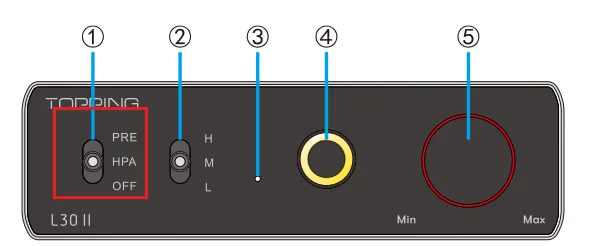
· Check the connections for all devices.
· Insert connection cables all the way in.
· Check the volume of all devices and whether they are muted.
Noisy playback
· Try with other songs.
· If the noise disappears after disconnecting RCA cables, the noise may be coming from upstream devices or caused by a ground loop.
· Check to see if the problem is with the source, downstream equipment and cables.
One channel with noise/no output
· Check to see if the problem is with the source, headphone and cables. You can try swapping the left and right channel connections and try with another headphone.
Channel imbalance
· Check to see if the problem is with the source, headphone and cables. You can try swapping the left and right channel connections and try with another headphone.


