
Power light off
· G5 need to be charge.
AUX in input, no sound
· Input and output are reversed. Connect to correct port.
· Signal cable did not connected properly. Check or change the cable.
· The player did not output. Check the player.
The connected USB device does not recognize this unit
· USB cable did not connected properly. Please check or change the cable.
· Try with another USB port.
· Driver problem. Try to reinstall the driver.
· May be caused by the PC. Check or try with another PC.
· Some phones require OTG function to be enabled first.
USB input, no sound
· Too low volume on PC. Please Adjust volume.
· G5 is not selected as the output device on the PC. Please set the G5 as the default output device.
Cannot pair G5 Bluetooth
· G5 does not switch to Bluetooth input. Please switch to Bluetooth input.
· G5 is already connected to other Bluetooth device. Let G5 enter pairing mode first. Switch Gain L→M→L→M→L→M within 3 seconds, status indicator flashes to mean G5 has entered pairing mode.
Bluetooth input, no sound
· Too low volume on phone. Please adjust volume.
Noisy playback
· Try with other songs.
· The specifications of songs are not supported by this unit.
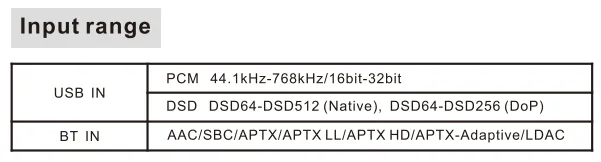
· If the noise appears only when playing DSD files, please check and adjust the computer system volume and music player volume to the maximum.
· Check to see if the problem is with the source, downstream equipment and cables.
One channel with noise/no output
· Check to see if the problem is with the source, headphone and cables.
Channel imbalance
· Check to see if the problem is with the source, headphone and cables.
Power indicator/Status indicator(Note that when switching to AUX input, the status indicator goes out.)
Power indicator Status indicator
OFF OFF G5 need to be charge.
Steady yellow --- Charging
Steady green --- Enough power or fully charged
Steady red --- Low battery
--- Flashing blue Input not connected
--- Steady blue Input connected
--- Steady blue Playing PCM
--- Steady red Playing DSD
Steady yellow Flashing blue Upgrading firmware
Steady yellow Flashing blue Upgrading firmware
Steady yellow Red light blinks once a second Firmware upgrade failed. Unplug and re-plug the USB cable, and then flash the firmware again.
Steady yellow Red light blinks twice a second Incorrect firmware version. Please re-flash the correct firmware.
Steady yellow Flashing red No firmware. Unplug and re-plug the USB cable, and then flash the firmware again.
Steady yellow Flashing red Please re-flash the firmware.
Steady yellow Steady magenta G5 is in DFU mode now. If you accidentally enter DFU mode, reboot this unit. Try to re-flash
the firmware if DFU is still displayed.
RED LED 2 Blinks, Pause 2s (Repeat) --- Negative and positive voltage abnormal. Disconnect other devices and reboot. If the problem still persists, your unit may be defective. Please contact the store where you purchased it.
RED LED 3 Blinks, Pause 2s (Repeat)--- Amplifier circuit outputs abnormal DC voltage. After changing the song or turning down the volume, unplug and re-plug the power cable and reboot the unit. If the problem still persists after disconnecting the other devices and restarting it, the unit may be defective. Please contact the store where you purchased it.
--- Flashing red DAC abnormal. Disconnect other devices and reboot. If the problem still persists, your unit may be defective. Please contact the store where you purchased it.


