
No sound
· The device did not power on. Check the power supply.
· Check that the proper input source is selected.
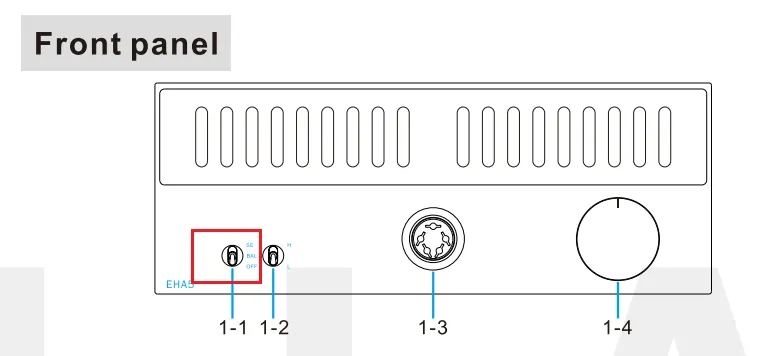
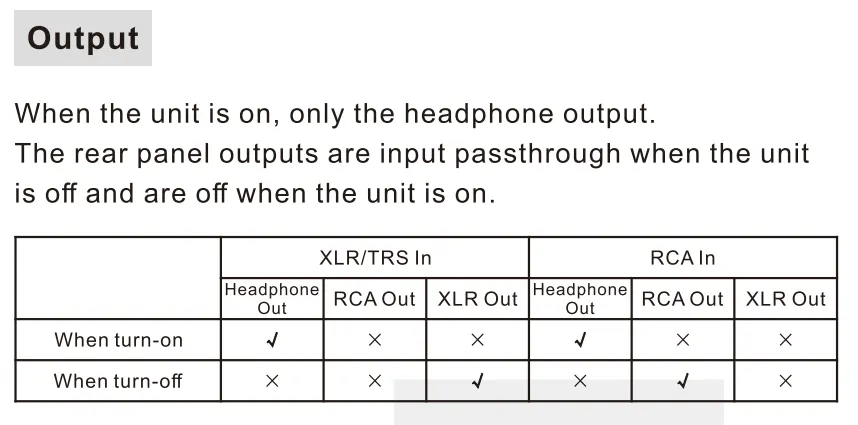
· Check the output setting.
· Check the connections for all devices.
· Insert connection cables all the way in.
· Check the volume of all devices and whether they are muted.
Noisy playback
· Try with other songs.
· Check to see if the problem is with the source, downstream equipment and cables.
One channel with noise/no output
Check to see if the problem is with the source, headphone and cables. You can try swapping the left and right channel connections and try with another headphone.
Channel imbalance
Check to see if the problem is with the source, headphone and cables. You can try swapping the left and right channel connections and try with another headphone.
LED 2 Blinks, Pause 1s (Repeat)
Incorrect firmware version. Unplug and re-plug the power cable, and then flash the correct firmware.
LED 3 Blinks / 4 Blinks, Pause 1s (Repeat)
Firmware upgrade failed. Unplug and re-plug the power cable, and then flash the firmware again.
LED blinks 1 time a second
Headphone output abnormal. After changing the song or turning down the volume, Unplug and re-plug the power cable and reboot the EHA5.
LED 3 Blinks, Pause 2s (Repeat)
Negative and positive voltage abnormal. Check the power adapter. Do not connect the EHA5 to any other devices and headphones, then reboot.
LED 2 Blinks, Pause 2s (Repeat)
Bias voltage abnormal. Disconnect the headphone, unplug and re-plug the power cable and reboot the EHA5. Check the headphone or try another headphone.


