
No sound
· The device did not power on. Check the power supply.
· Check the connections for all devices.
· Insert connection cables all the way in.
· Check the volume of all devices and whether they are muted.
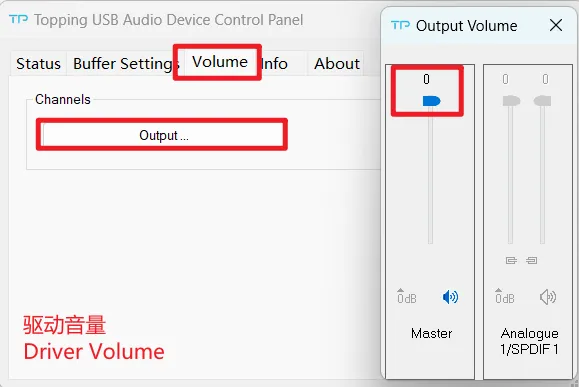
· Too low volume on PC. Please check and adjust the computer system volume, music player volume and driver volume.
· Select the default output device of your music player or computer as this unit.
Noisy playback
· Try with other songs.
· The specifications of songs are not supported by this unit.

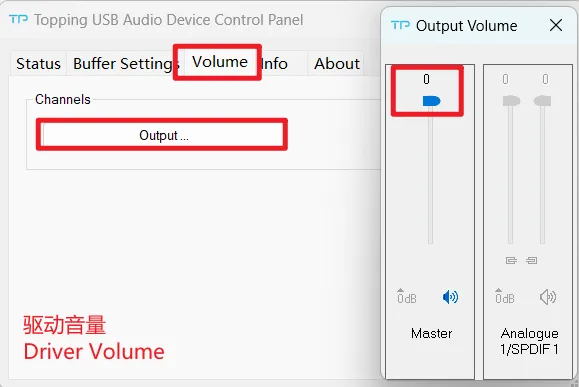
· If the noise appears only when playing DSD files, please check and adjust the computer system volume and music player volume to the maximum.
· Check to see if the problem is with the source, downstream equipment and cables.
· If the noise disappears after unplugging the USB cable, it may be interference from the source. You could try to add a USB isolation between this unit and the source.
One channel with noise/no output
Check to see if the problem is with the source, headphone and cables. You can try swapping the left and right channel connections and try with another headphone.
Channel imbalance
Check to see if the problem is with the source, headphone and cables. You can try swapping the left and right channel connections and try with another headphone.
The volume is not adjustable
The knob is used to adjust the volume of headphone output. the volume of Line out is not adjustable and is the maximum value.
Filtering mode
Fast roll off linear


