
Insufficient power supply
Problems that may occur:
1. Abnormal sound
2. Can't be recognized
3. Can be recognized but no output
4. SPDIF output but no RCA output
5. Noise on one channel
· If it is connected to mobile phone, it is caused by insufficient output current from the mobile phone, so it is recommended to connect it to a computer for use.
· If it is connected to a computer, please try to use the USB port on the computer's host and use a USB cable within 1.5m, or even try a different USB cable.
The connected USB device does not recognize this unit
· USB cable did not connected properly. Please check or change the cable.
· Try with another USB port.
· Driver problem. Try to reinstall the driver.
· May be caused by the PC. Check or try with another PC.
Noisy playback
· Try with other songs.
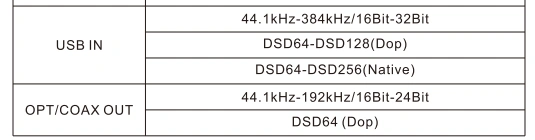
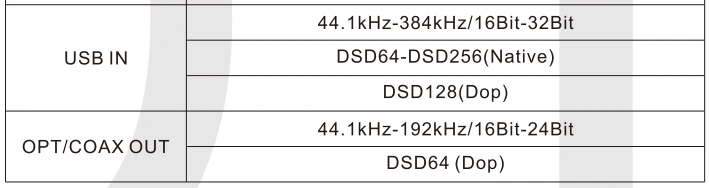
· The specifications of songs are not supported by this unit.
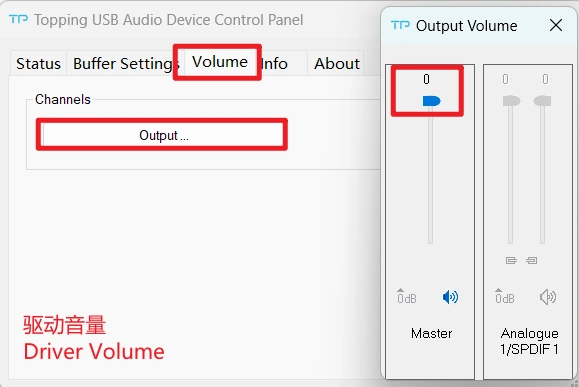
· If the noise appears only when playing DSD files, please check and adjust the computer system volume, music player volume and driver volume to the maximum.
· Check to see if the problem is with the source, downstream equipment and cables.
· If the noise disappears after unplugging the USB cable, it may be interference from the source. You could try to add a USB isolation between this unit and the source.
One channel with noise/no output
· Check to see if the problem is with the source, downstream equipment and cables. You can try swapping the left and right channel connections and try with another source.
Channel imbalance
· Check to see if the problem is with the source, downstream equipment and cables. You can try swapping the left and right channel connections and try with another source.
The sample rate displayed on the device does not match the music file
· The choice of music player app, the setting of music player and the setting of computer/phone will all have an impact on the sampling rate.
· The sampling rate displayed by this unit is the sampling rate of the input signal, and it will not change the sampling rate by itself.
· If the music player can be set to exclusive mode, the audio signal will not be resampled by the computer/phone, so the sampling rate of the output signal is the sampling rate of the original file, and the sampling rate displayed by this unit is also the sampling rate of the original file.
· Because some players can't be set to exclusive mode, the audio signal will be resampled by the computer/phone and then output. So this unit will always display the sampling rate set by the computer/phone.
· We recommend using Audirvana player on MAC OS and Foobar on windows OS.
No output on optical and coaxial during DSD playback
· Check if the optical/coaxial input of the downstream device supports DSD.
· Check that the song being played is within the supported range of this unit.
Filtering mode
· Fast roll off apodizing


