
1. Precaution
This firmware is intended for use with DX1 II only and is not compatible with other models. Flashing this firmware onto a different model may render the product inoperable and irreparable. If your firmware version is already V2.46, there is no need for this upgrade.
2. How to check the firmware version
In standby mode, press the <, >, and Mute buttons on the remote control in sequence to display the firmware version.
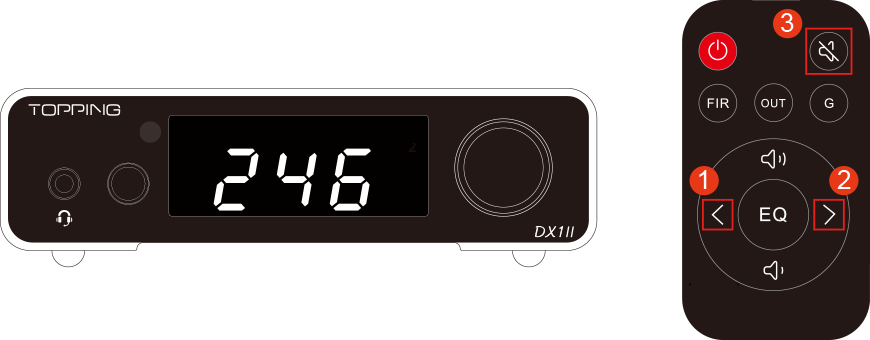
*The picture is only for reference.
3. Download
Windows: Download here (This update requires a Windows 10 or higher OS with driver installed. Drivers could be downloaded here)
MAC: Download here
4. How to update the firmware
1. Switch the UAC mode to UAC 2.0. If the device is already in UAC 2.0 mode, skip this step.
2. Use a USB cable to connect the USB port of the DX1 II to a USB port on the computer.
3. Locate the downloaded firmware upgrade package, extract it, and run the .exe application in the extracted folder.
4. Click Browse... and select the .bin firmware file in the folder.
5. Click Start, wait a few seconds (Please do not interrupt the device during the update process).
6. When the message "Firmware upgrade finished successfully." appears, the firmware upgrade is complete. Click Exit to close the program.
5. Problems may be encountered
If the firmware update fails, please try the following:
1. Use a different USB port. We recommend using a USB port on the back of the desktop computer first. If the issue persists, try connecting the device to a USB hub with an independent power supply.
2. Use a different USB cable. We recommend using a cable no longer than 1.5 meters. Please connect the device directly whenever possible, and avoid using adapters or converter cables.
3. Try updating the firmware on another computer.
4. Try entering DFU mode, then perform the firmware update again.
6. What's updated
* Fixed: After automatic screen-off, sample rate changes were not synchronized on the web interface.
* Fixed: After automatic screen-off, noise could occasionally be output.
* Fixed: Under USB input, the clock did not switch when the sample rate changed.
* Fixed: Several other known issues.


